Bulk price updates
Raise or cut prices by a percentage, or set every selected line to the same fixed unit price — across a whole book of repeating invoices in one pass.
Works with your Xero account
Xero can't bulk-edit repeating invoices. Invoice X connects to your Xero account, loads them all, and updates prices across the whole book at once — with a live preview before anything is written back.
$29 USD/month · 5 users · One simple plan
New here?
Invoice X is a small, focused add-on for Xero. It does the one thing Xero can't: change prices across a whole book of repeating sales invoices at once.
You connect your Xero account, load your repeating invoices, select the lines to move, preview the exact new prices, and push a verified result back to Xero. It also gives you a forward forecast of your repeating revenue that Xero doesn't provide.
Authorise Invoice X with your Xero account through Xero's standard OAuth flow. Set up entirely in the app.
Pull your repeating sales invoices from Xero, then tick the templates and lines you want to reprice.
Set a percentage or a fixed price and see the exact old and new price for every line before you commit.
Send the approved changes back to Xero. Each template is rebuilt and verified, so nothing is lost.
Built for the finance teams that reprice a whole book of repeating invoices — and want it done in minutes, not an afternoon.
Repricing in Xero today
Xero has no bulk edit for repeating invoices and no "update repeating invoice" call at all. Putting fees up across a book of templates is a manual job, once a year, line by line.
With Invoice X
One screen. Select the lines, set a percentage or a fixed price, check the preview, and push the verified result back to Xero.
Features
Invoice X does one job properly, then gives you the forward view of your repeating revenue that Xero doesn't.
Raise or cut prices by a percentage, or set every selected line to the same fixed unit price — across a whole book of repeating invoices in one pass.
The exact new price for every line, computed by the same engine that applies it, with the total movement per billing cycle. What you see is what Apply writes.
A minimum-increase floor for when a rate lands too small, round to 50c / $1 / $5 / $10, and a start date for when the new prices begin billing. Applied in a fixed, predictable order.
Each changed template is created, verified field by field, and only then is the original retired. A customer is never double-billed or silently dropped.
Every change is a draft until you push. Nothing reaches Xero until you say so, and Undo all discards every pending change at once.
Forecast the book forward month by month, grouped by GL account, customer or currency, over 12 / 24 / 36 months — with CSV export. The report Xero doesn't give you.
A multi-currency book is scoped per currency, never summed into one meaningless total. Pick which Xero organisation to load when your login reaches several.
Up to 5 users share one workspace. Every price run and every push is recorded against the person who made it.
The product
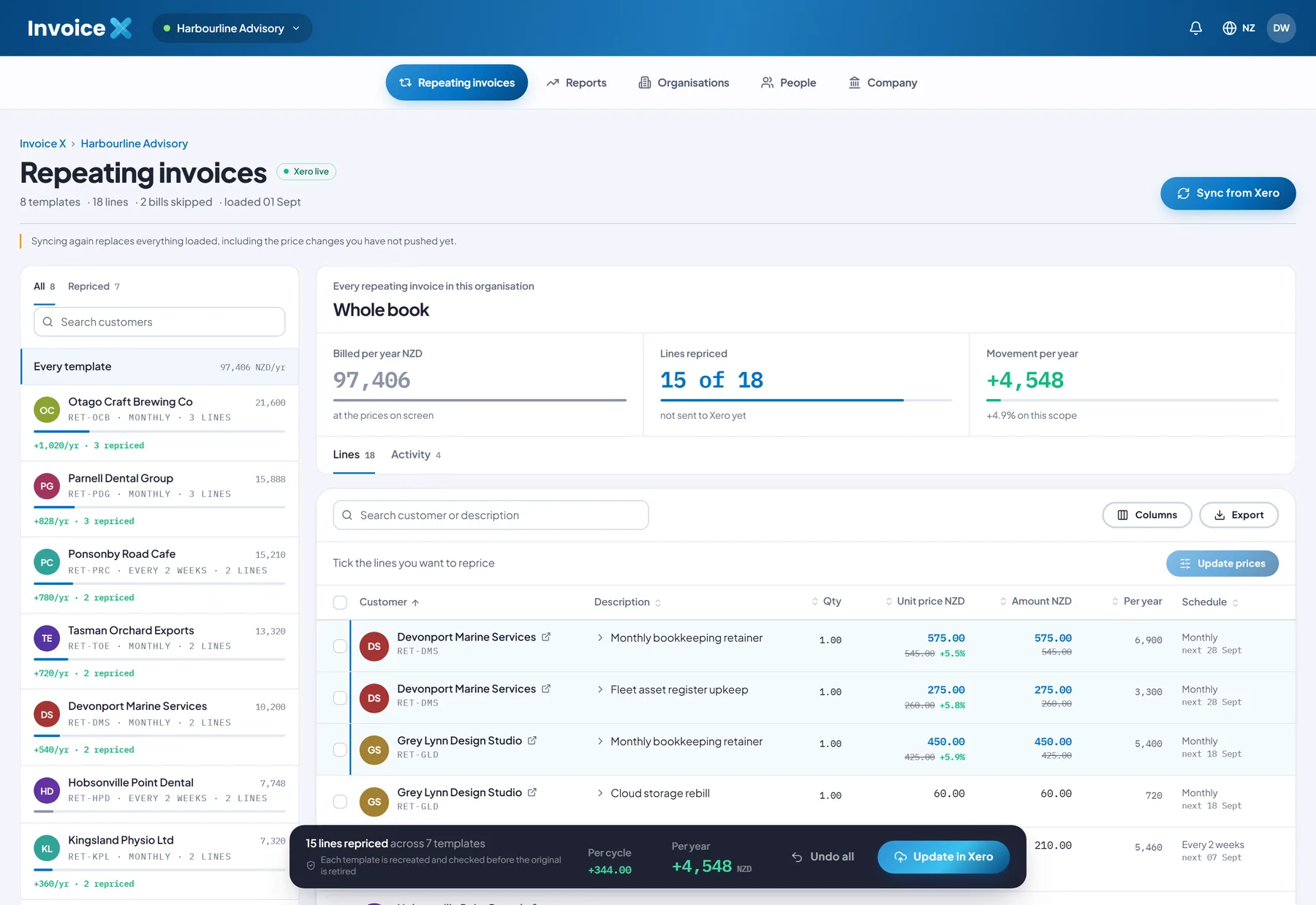
This is the actual Invoice X app, running against a sample Xero book. Every figure on screen is computed the same way it is on yours.
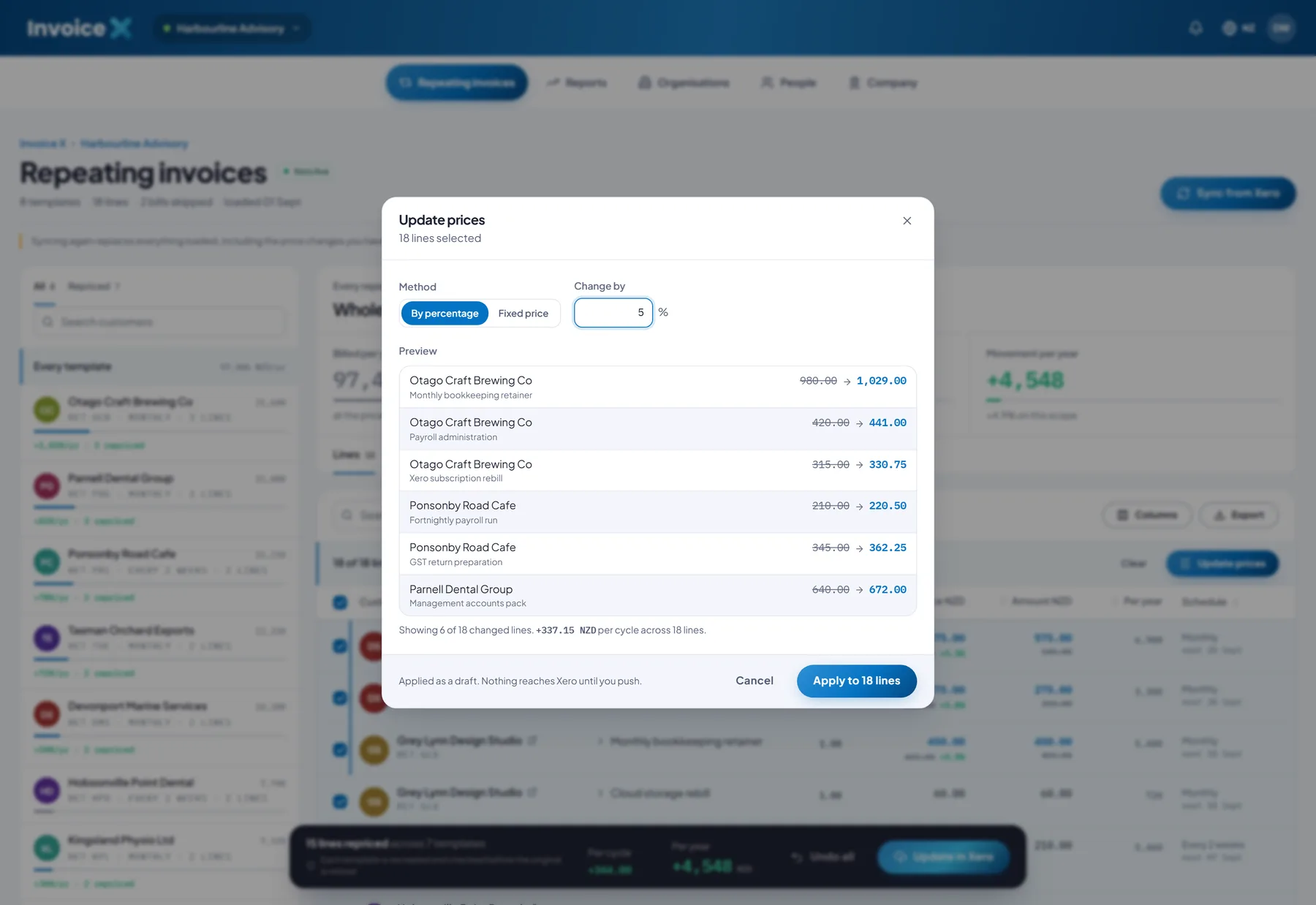
Update prices. Set a percentage or a fixed price and see the exact old → new price for every line — computed by the same engine that applies it — before anything is staged.
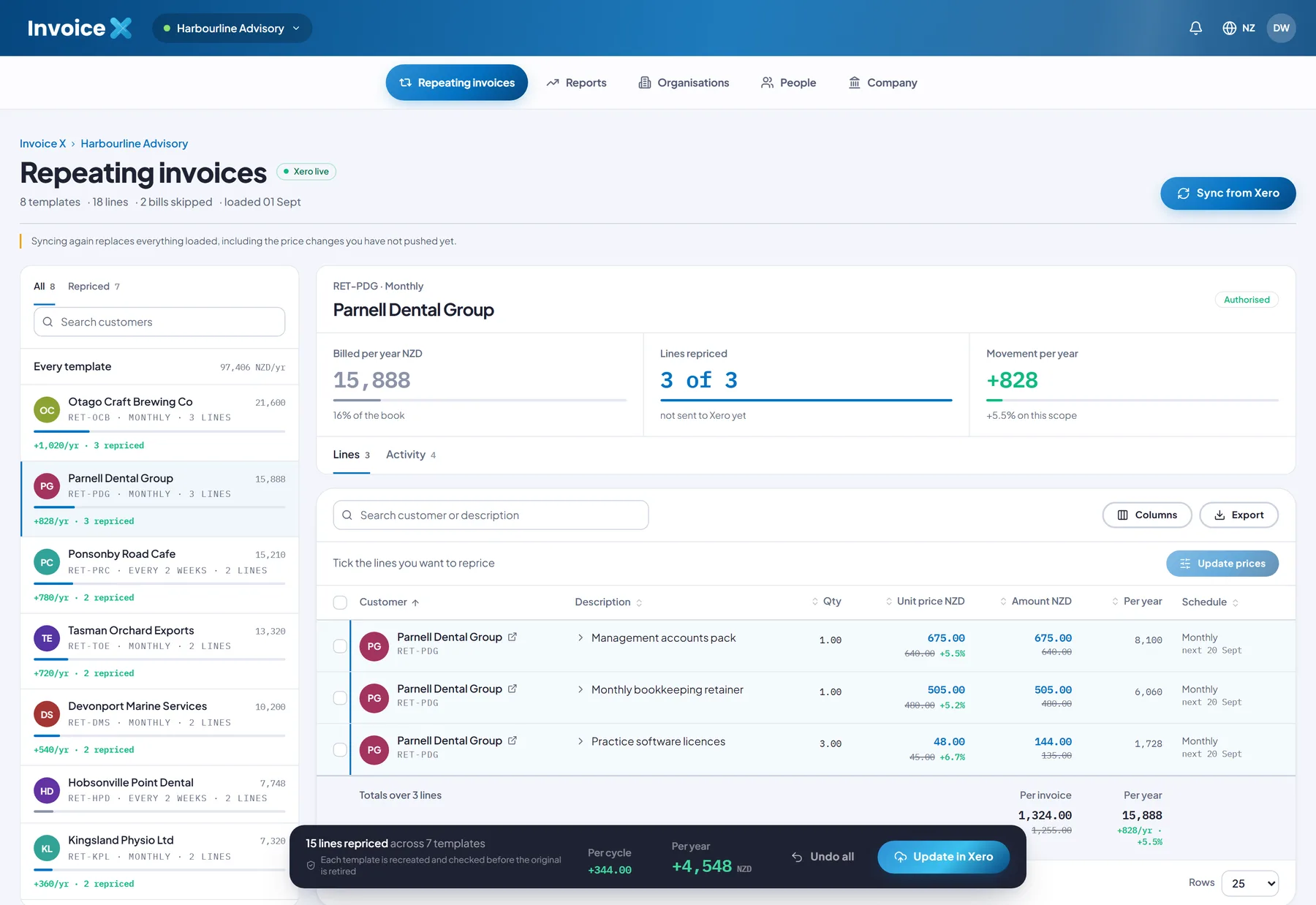
The register. Scope to one customer or the whole book; see billed-per-year, lines repriced and movement at a glance.
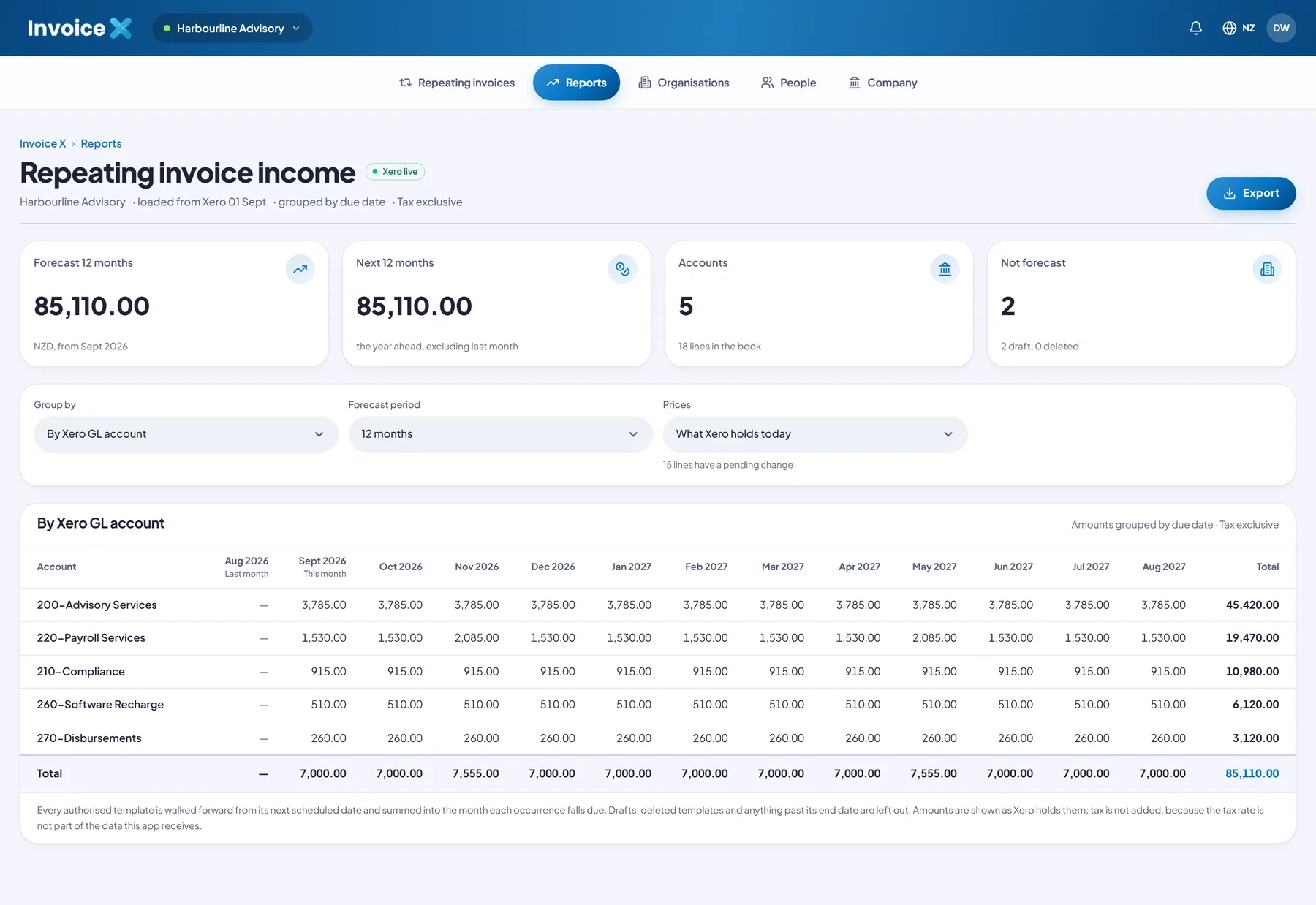
Forecast reports. Project the book forward 12–36 months by account, customer or currency. Export to CSV.
Write-back
Xero has no call to update a repeating invoice. Invoice X rebuilds each changed template as create → verify → retire: the replacement is created, read straight back and checked field by field, and only then is the original marked deleted.
A failed check rolls that template back and leaves the original running — so a customer is never double-billed or dropped. Progress is reported per template, and Undo all discards every pending change before a push.
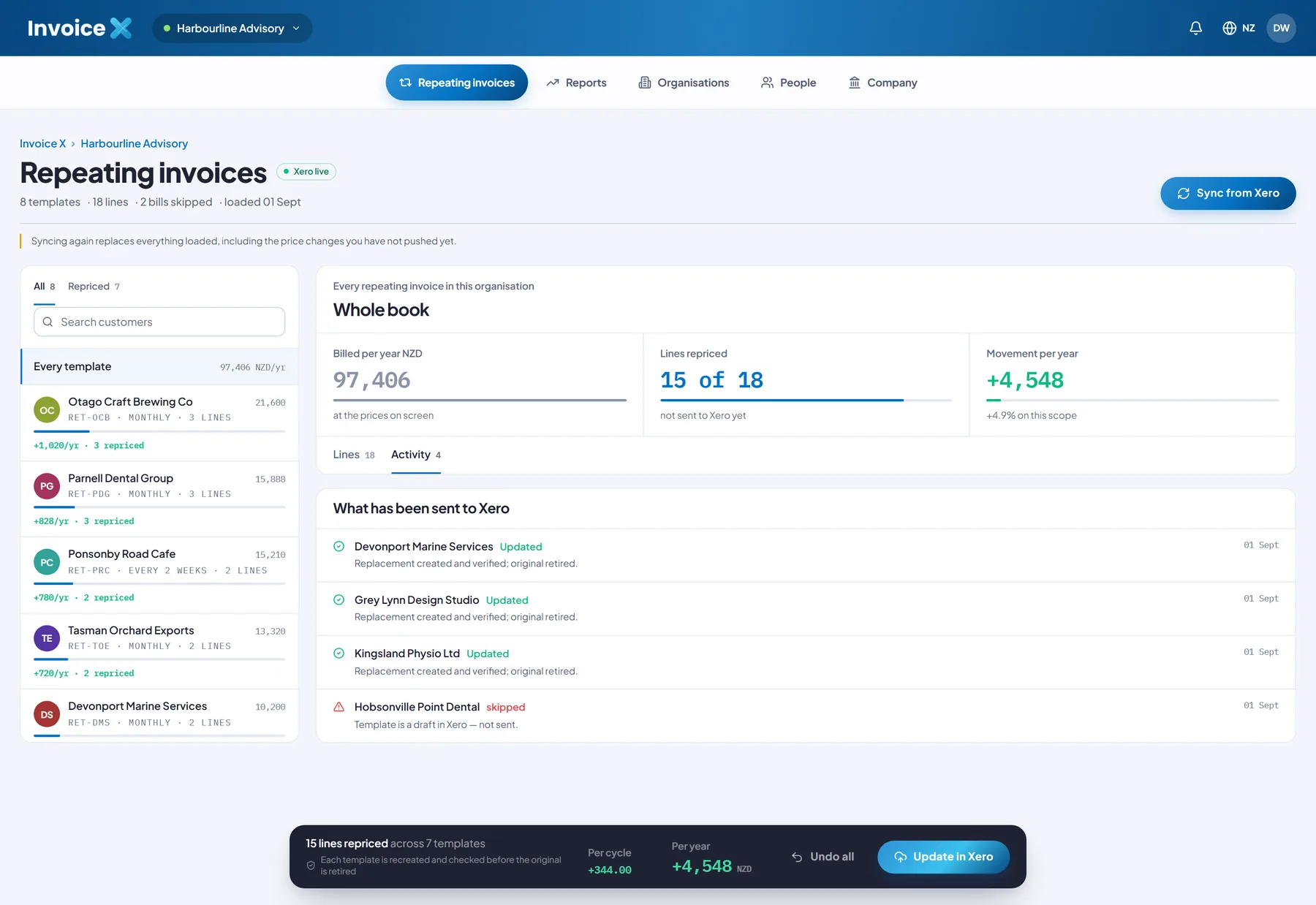

The annual price rise
The yearly repricing across a book of repeating invoices is exactly the kind of careful, repetitive work that should be one pass with a preview — not fifty open tabs.
Pricing
No tiers to compare and no feature matrix to decode. One package, the whole tool, up to five users.
Invoice X · monthly
Up to 5 users included
No feature tiers, no per-invoice fees, no add-ons to price up. One package that covers your whole team.
$29 USD/month from the day you subscribe. No free trial, no long forms. Cancel anytime.
Included
Security & trust
Invoice X connects through Xero's standard OAuth 2.0 flow, reads only your repeating sales invoices, and writes nothing back until you push. Every change is verified in Xero before the original is retired.
Read about our approachFAQ
Still unsure? Talk to us and we will help you decide if Invoice X fits your Xero setup.
Invoice X is a focused tool that does the one thing Xero can't: bulk-edit repeating sales invoices. You connect your Xero account, load your repeating invoices, select the lines to change, update the prices in a single pass, and push the result back to Xero. It also includes repeating-revenue reports that Xero doesn't provide.
Yes. Invoice X works on top of your existing Xero organisation — it reads your repeating sales invoices from Xero and writes the updated versions back. It is not a standalone invoicing system and does not replace Xero.
Only the repeating sales invoice templates you select, and only their line prices. Nothing is written back until you press the button that says so. Bills (accounts payable) are never touched.
No. Xero has no "update a repeating invoice" call, so each changed template is rebuilt safely: Invoice X creates the replacement, reads it back and verifies it field by field, and only then retires the original. If verification fails, the original keeps running and the replacement is rolled back.
As you set a percentage or a fixed price, the same engine that applies the change computes the exact result and lists the old and new price for every line, plus the total movement per billing cycle. The preview cannot drift from the outcome because Apply runs the identical calculation.
Any pending change lives as a draft until you push. Undo all discards every pending change at once. After a push, the original templates have been retired in Xero, so treat push as the commit point — the preview is there so you can be sure first.
A repeating-invoice income forecast: every authorised template projected forward month by month, grouped by Xero GL account, by customer or by currency, over 12, 24 or 36 months, with CSV export. It answers "what is this book of repeating invoices worth over the next year" — a question Xero doesn't answer directly.
One plan: $29 USD per month, including up to 5 users. No feature tiers, no per-invoice fees, no add-ons. Everyone on the plan shares one workspace with a full audit trail of who ran and pushed what.
Yes. A multi-currency book is scoped per currency so you never work against a total summed across currencies, and if your Xero login can reach several organisations you can pick which one to load.
No — Invoice X is a paid tool at $29 USD/month, billed from the day you subscribe. There is no free trial. What you can do first is explore the full interface on built-in sample data (eight sample repeating invoices) without connecting Xero or paying, so you can see exactly how the workflow feels before you subscribe.
Yes. The plan is month to month with no minimum term. Cancel from your account settings and you keep access until the end of the current billing period. Fees already paid are not refunded except where the law requires it.
Guides
Xero has no bulk edit for repeating (recurring) invoices. Why that is, what each workaround costs you, a worked 5% example, and how to reprice a whole book in one previewed pass.
Where to find the right CPI figure, how to turn it into a defensible rate, and how to apply it across every Xero repeating invoice without opening them one at a time.
No — Xero repeating invoice templates keep their own copy of the unit price, so updating an item in Products and services changes nothing on existing templates. Here is why, and how to update the whole book at once.
News & updates
Invoice X now reads each organisation's own tax rates from Xero — 10% GST in Australia, 15% in New Zealand, VAT in the UK — so pushes verify correctly and totals are right. See the release notes for version 1.1.0.
The report page can now break the 12/24/36-month forecast down by customer or by currency, not just by Xero GL account. Each view exports to CSV.
The Update prices dialog shows the total dollar movement per cycle alongside the per-line old → new prices, so a whole run can be sanity-checked at a glance.
Subscribe for $29 USD/month and do the annual price rise in one previewed pass — or explore the interface on sample data first.
$29 USD/month · Up to 5 users · One simple plan